Blog

  • Take off some time on November 8, 2016.

    We will be closed for election day (and Veterans Day). Although this is common for us we noticed that companies can now add their name to the list of growing companies that offer it off to their employees.

    http://takeoffelectionday.com/ 

    See if your company is on the list. If not show your support and ask your company to submit your information.

    Full Company List

    http://takeoffelectionday.com/companies

    Here we are

    image

  • Transfer Domain Names

    To transfer a .com, .net, .org, .biz, .tv, .us, .info, or .name to another registrar, the registry requires that you confirm an authorization code.

    The authorization code is unique to each domain name and is assigned by the registrar at the time of registration.

    Current registries assigning auth codes are: Verisign (the .COM and .NET Registry), Public Interest Registry (the .ORG Registry), Afilias (the .INFO Registry), NeuLevel (the .BIZ Registry), and NeuStar (the .US Registry). Auth codes provide an extra level of security for your domain names. When you register a NEW .com, .net, .info, .biz, .us, or .name with us, we store and maintain your authorization code.

    Videos Below

    [accordions]

    [accordion title=”How to transfer a domain name from Register.com” ]

    [/accordion]

    [accordion title=”How to transfer a domain name from GoDaddy”]

    [/accordion]

    [accordion title=”How to transfer a domain name from web.com”]

    https://youtube.com/watch?v=of6cQ9v8t1A

    [/accordion]

    [accordion title=”How to transfer a domain name from 1and1.com”]

    https://youtube.com/watch?v=CBnQ1hK6bMc

    [/accordion]

    [accordion title=”How to transfer a domain name from Network Solutions”]

    https://youtube.com/watch?v=NS10pd3efek

    [/accordion]

    [accordion title=”How to transfer a domain name from NameCheap”]

    https://youtube.com/watch?v=vuIlsiTzgZU

    [/accordion]

    [accordion title=”How to transfer a domain name from Melbourne”]

    https://youtube.com/watch?v=fooeI8QbBr4

    [/accordion]

    [accordion title=”How to transfer a domain name from Joker”]

    https://youtube.com/watch?v=EK_fNbGLrYE

    [/accordion]

    [/accordions]

    How to transfer? PDF instructions

    [caret_list]

    [/caret_list]

  • Mobile Websites: Separate or Responsive?

    Which one is for me?

    There are two main ways to create a mobile website. One is creating a responsive website design. The second and often deemed less expensive route is the separate mobile website often with m.domainname.com or domainname.mobi for the domain.

    Each style has pros and cons and the type you go with depends on your clientele and industry.

    Go Mobile or Be History

    Engage your customers with Click to Call, Maps, and Social Networking and more. Turn traffic into business with full mCommerce enabled sites. Take reservations, offer coupons or design your own custom forms.

    Click to View a Mobile Website Demo

    Responsive Web Design (RWD)

    Essentially this means a web site is crafted to use Cascading Style Sheets 3 media queries, fluid proportion-based grids that adapt the layout to the viewing environment. It includes the use of flexible images and content. As a result, users across a broad range of devices have access to a single source of content, laid out so as to be easy to read and navigate with a minimum of resizing, panning, and scrolling.

    Click here for a Responsive Site Design Demo (use your cursor to change the size of your browser window

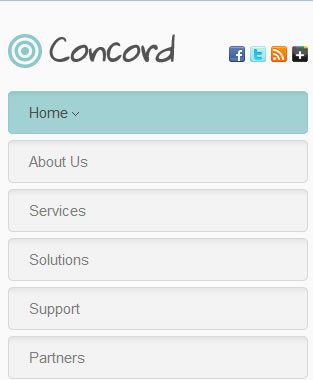
    Tablet

    responsive_tablet

    Phone

    responsive_phone

    Separate Mobile Site

    Not ready to have your current site converted to a mobile site but want to go mobile we have the solution for you.

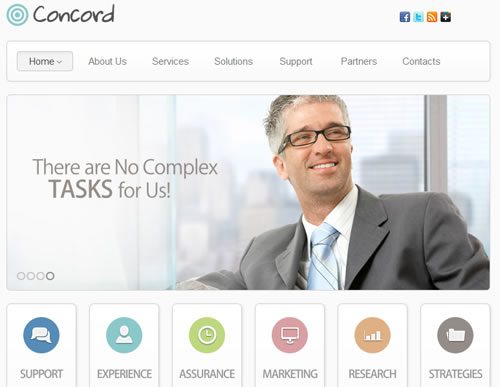
    Choose from a style below and get your mobile site up and running in just a few days. Incorporate your logo, colors, styles, and icon sets.

    Use icon sets from our stock photos or have one of our graphic designers create unique icon sets just for your business.

    Want more choice?

    Not quite sure if you want the basic templates above, but you are still not ready to overhaul your current site well we can help you there as well. Choose from a full range of premium templates or have one of our excellent graphic designers work with you to give you a great mobile design. It costs a little more to get you up and running but it might just be what you are looking for.

    Call 617.821.3446 or contact us today.

  • Dropbox Hack or Hoax

    Today you may have heard about a Dropbox hack of 68 Million people’s data but this isn’t a new hack. This is a hack that happened in 2012. The thing that is putting this in the news today is that the files have been found on the internet and are being confirmed as the real deal.

    So what does this mean?

    When this was first discovered 4 years ago Dropbox said that they sent everyone a link to reset their password. Whether people did or not is the concern.

    Here is an article that explains some of the concerns about the data that has turned up today.

    https://www.wired.com/2016/08/hack-brief-four-year-old-dropbox-hack-exposed-68-million-peoples-data/

    and a senior Dropbox employee told the publication that the credentials were legitimate, and data leak compiler and security researcher Troy Hunt has since chimed in to agree.

    https://www.troyhunt.com/the-dropbox-hack-is-real/

    If you haven’t already reset your password, and don’t think a variation of your password will be enough, reset the password and any passwords that could be similar, hackers are very smart and where there is a will, an algorithm, and a hacker there is a way.


    Note: When using an open source platform such as WordPress and third party software such as plugins, it may occur that these plugins contain bugs, are not compatible with new release of WordPress or the customizations made to your theme.

    Please note that this is for information only. Inclusion of any company, person or organization does not imply an endorsement of its products or services.

  • Email Marketing Best Practices

    Check out a fun infographic for best practices for email marketing
    Email Marketing: All That Sizzles Is Not Spam


  • How To Create An E-Mail

    Our complete knowledge base for Email marketing can be found at: http://kb.blackrocknetworks.com

    Creating an e-mail message using our service is a simple process. Familiarize yourself with our sending guidelines. If you send a message that does not conform to our terms of service it will be rejected. The guidelines can be found here: Why was my email rejected?

    The following steps will guide you through creating your first email message:

    1) Click on “Compose an E-mail”


    2) Select how you would like to design your message. You can use one of our pre-designed templates or create your own layout from scratch. For the purposes of this guide we’re going to select “Build it Yourself.” Once you make your selection click “Continue.”


    3) On this screen you can choose between writing straight HTML and using our editor. We recommend  using our editor if you are not familiar with HTML. If you want to send a text only message leave the HTML section blank and proceed to step 4.


    4) After creating the HTML version of the message scroll to the bottom of the screen. Check the box indicating that you have placed your full physical mailing address in the message. Then click “Continue”


    5) Create the plain text version of the message. This is important because some recipients cannot receive HTML messages.


    6) Once again agree that you’ve placed your full mailing address in the message and then click “Continue.”


    7) Once you get to this screen you’ve created the message. Now you can save the message or schedule it to be sent out to your mailing list.

  • Uploading your List of Subscribers

    Our complete knowledge base for Email marketing can be found at: http://kb.blackrocknetworks.com

    File Requirements:

    • The file can be in .txt (text) or .csv (comma separated values) format (i.e. mylist.txt, mylist.csv) and either tab, comma, semicolon, or colon delimited. We find that a tab-delimited, text (.txt) file works best. If you have the data in a Microsoft Excel file (.xls), you can open it in Excel, then go to File->Save As, and choose ‘Save as type’ to ‘CSV’.
    • Maximum file size is 10MB (please contact us if you need to upload a larger file)
    • All lists should be cleaned before you import them (i.e. remove unwanted columns, fields, etc.)
    • Each member’s email address and demographic data must appear on a separate line.
    • Subscribers will see their imported demographic information.
    • As per our Terms of Service, you MAY NOT import purchased or co-registered lists

    Once you have confirmed that your file meets the guidelines above you will need to import the file. To do this follow the directions below:

    1) Starting on your dashboard click the “Subscribers” tab.


    2) Click on the “Add/Import” button.


    3) Click the “Upload a File” radio button.

    4) Click the “Browse” button and select the file that you would like to import.


    5) Make a selection off the “Separator” drop-down. CSV files will always have “Comma” as the value. If you are not sure what to select here you will need to consult with the e-mail service provider or application vendor that generated the file. Click “Continue”


    6) Now you will need to associate the information in your file to our data fields. Look at the image below for an example. The value on the left, “Email Address”, came from the file being imported. On the right side you would choose “E-Mail address” to associate the “Email Address” values in the file to the “E-Mail address” fields in our database.


    7) The “Advanced Options” section contains two areas. The first “Merge matched records?” is asking what to do if any e-mail address are both on your subscriber list in Email System and the list you are uploading. Choosing “No” will stop the upload if any duplicates are found. Choosing “Yes” will cause the duplicate entries to be overwritten with the values of the list you are uploading.

    The second section “Keep first row?” is asking if the first column in your file is a subscriber or if it contains the names of each column. The first line in most files contains column names.


    8) Make a selection for “Don’t Update Columns with Blank Input.” This will prevent information already uploaded from being overwritten with blank values from your file. Once you do this click “Continue.”


    9) Select which mailing lists you’ve created on our end that you would like the subscribers off of your file to be part of. Once you make your selections click “Continue”


    10) Confirm that you have selected the correct lists and agree to our legal agreements and the click “Start Import”


    11) If the import process goes through you will get a confirmation showing that the import was complete.

  • Ways to use Houzz.com

    For more information about using Houzz as a professional, check out the following links:

    For architects: http://info.houzz.com/aug7webinar.html
    For designers: http://info.houzz.com/july31web.html
    For builders/remodelers: http://info.houzz.com/txwebinar.html
    also a relevant article for remodelers: http://bit.ly/Mow08M
    For vendors/showrooms: http://info.houzz.com/july31web.html

  • Windows 10 finally surpasses XP

    Looks like giving away the software for free worked. Of course so many people downloaded it because of that without testing to see how it would impact their software compatibility. I would be curious about the numbers of how many people uninstalled it.


    http://money.cnn.com/2016/02/02/technology/windows-10/index.html?iid=ob_homepage_tech_pool&iid=obnetwork

  • Show Unread emails in Favorites Folder in Outlook 2010

    So this has perplexed me for some time but not enough for me to dig deep into finding a solution, until now.

    Today I added a 5th email account to Outlook and decided it was time to solve this problem.

    Up until now I have all my “inboxes” under my favorites so that I don’t have to scroll all the way to the bottom of my side panel to see what I have for new emails.

    However over the past few months Outlook seems to no longer show the unread count (or bold) for the favorites folder. If I scroll to the bottom the inbox shows the count but what good is having a favorites section if you still have to scroll down.

    I know that Outlook is downloading new messages in the background, but the new message count is not automatically updated in the folders under Favorites.

    So the search began for a fix. I tried various fixes recommend on a number of support forums and none seemed to work. Than I stumbled across a combination solution which has finally resolved the issue.

    One way is to change the startup page to the Outlook Today page. That seemed to refresh the folders but  I really just want to open Outlook to view my email, not the Outlook today screen.

    Instead I did this:

    • Open Outlook Today by clicking on the account name for your default Outlook data file (often the first one in the folder list)
    • Click “Customize Outlook Today” in the upper right.
    • On the options screen, select “Choose Folders”, then select the Inbox under each IMAP account. Deselect anything that isn’t relevant.

    This appears to cause the Favorites folders to “refresh” when Outlook starts up, making them show the number of unread messages.

    Just thought I would share some new iPhone Cases  http://amzn.to/1PYXWCM

  • Turn off Suggested Videos on YouTube and embed in WordPress

    Many people want to share their videos on their own website that have been uploaded to YouTube. A great idea considering that YouTube doesn’t charge for hosting videos. (At least not yet) But often when you embed a video you get a whole list of suggested videos at the end once your video is finished playing. Now who wants to send a website visitor to another website after doing so much to get them there in the first place.

    In this video you can see how to turn off the suggested video feature when you embed a YouTube video on your website or blog. This example shows embedding in a WordPress website.

  • How to change your Webmail Signature Locations

    Use the Signatures feature to make changes to your email signatures when sending through webmail.

    Click the Settings icon on the top right by your email account.

    Settings >> Composing Mail >> Signatures

    signature

    To add a new signature, click the Add New Signature button, and enter a signature name and a signature in the spaces provided. Images can be uploaded for use in the signature using the Insert/Edit Image button in the HTML composer menu bar.

    Use the Plain Text View and HTML View links to switch between the two.

    Note: Signatures can be HTML or Plain Text, but not both.

    To edit a signature, select a signature, and click the Edit button.

    To delete a signature, select a signature, and click the Delete button.

    Choose options for when signatures are automatically inserted in emails, as needed.

    To set a default Signature follow the steps below:

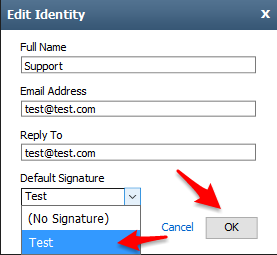
    Click the Identities tab, double-click your email address, and then enter the following information in the spaces provided.

    • Full Name: This name will appear in the From field of messages that you send.
    • Email Address: Enter the email address that should be displayed as the From email address.
    • Reply To: Enter in the email address that you want recipients to use when they reply to your email message. If you leave this field blank, the address you entered in the Email Address box is used automatically.
    • Default Signature: Select a signature to use with this identity.
  • What does net neutrality mean for you?

    It still amazes me that people would rather take sides based on political positions rather than determining what it in the best interest of the people. Take the Net Neutrality for example, most people seem to take their position based on talking points on TV and the internet. Of course the reason we can see and hear these is because the internet allows access to many of these streaming services.

    Many people have asked us where a company like ours stands on this issue. Well it is a tricky question since each has some pros and cons but I thought it best to just show a video on what it is rather than give my personal opinion.

  • Using Contact Form 7

    In many of the websites we develop in WordPress one of the more popular plugins we use is the Contact Form 7 plugin. It is fairly simple to use. A little short code added to a post or page and you have a contact form.

    Need a more customized contact form you cna add and edit feilds as needed to give it a very polished look.

    In the video below you can see how to edit form fields as well as change text to other languages if needed.

    Below are links to the documentation porovded by the devleoper of Contact Form 7

    Getting Started

    Creating Forms

  • ICANN Goes International. Is it a good thing?

    US Agreement With ICANN Leaves Much Undone
    “The oversight of the Internet’s infrastructure will become more international under a new government agreement with ICANN. But many concerns remain unresolved.”

    Not that I disagree in the idea that all people be involved in a free and open internet; I believe that opening ICANN up in a United Nations Model without any clear agreements in place about who and how domains can be used is a problem. Countries that support censorship in areas such as search engines would likely look to impose censorship of domain purchases in one form or another. Really look how well and how fast the United Nations works now when accomplisging goals.

    In case you haven’t already noticed the chaos of all the new domain extensions coming at you in email after email, .expert, .guru, .almostanything, you can see how it is already starting to run away.

    With all these new regulations and requirements being added to ICANN for domain name registrars  we have decided to partner with TuCows to manger domain registrations to help keep up with the ever changing regulations coming this way. With this partnership customers will be able to manage their domain names themselves, update their billing and have full control over their domain names. This does mean that clients will be fully responsible for keeping their contact and billing information current in order to avoid the cancellation of their domain.

    tu_125x50

    “The Tucows Domain Promise”

    “When you buy a domain name through a Tucows partner, you are buying more than just a domain name. You are buying a commitment to the fairest, most honest, most consumer-friendly principles and policies in the industry. Taking that commitment even a step further, we offer you this promise. Read More”

    ——————-

    So why buy through TuCows and Blackrock Networks, Inc instead of GoDaddy or Network Solutions?

    Here’s why:

    • Free contact privacy! (most domains/TLDs) NO Extra fee to keep your info to yourself.
    • Free easy-to-use domain manager. Even non-techies can make updates without being bombarded by constant ads.
    • Select from a large inventory of premium names
    • Free easy to use DNS
    • Free Domain Forwarding

    To purchase a domain go to http://domains.blackrocknetworks.com