Blog

  • World Password Day

    Yes, that’s right; there is a day for passwords too. It seems almost everything has a national day, from doughnuts to screen time. However this one is worth taking note of. We would hope people change their passwords more frequently but if you at least take the time to change it and rethink how secure it is that is a start on the first Thursday in May that is a start. Also consider adding 2-factor authentication too.

    “Treat everyday like Password Day and #LayerUp your login to make the Internet a more secure place.” – https://www.passwordday.org/

  • Clear your Cache in Chrome

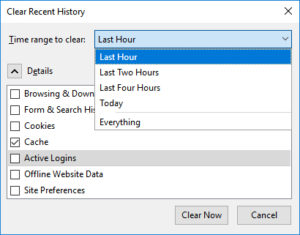
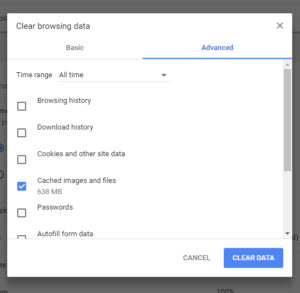
    There was a time when clearing your cache seemed as simply as refreshing your screen. Now that more information is being stored so that sites can load quickly it requires a few more steps to clear your cache. On the plus side there is still a keyboard shortcut to help you access this menu.

    The keyboard shortcut is Shift+Ctrl+Delete.

    After you have cleared your cache go back to the web page you were reviewing and press F5 to refresh and you should see the most recent version of the site.

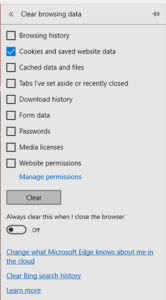
    The keyboard shortcut will work in Microsoft Edge/ Internet Explorer and Firefox as well. The screens look like below.

    Microsoft Edge

    Firefox

  • Update your Phone # to recover your password in webmail

    How do I update my phone number?

    Log in to your Webmail account at webmail.blackrocknetworks.com

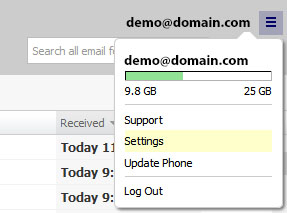
    In the top-right corner, click the account’s username and then select Update Phone.
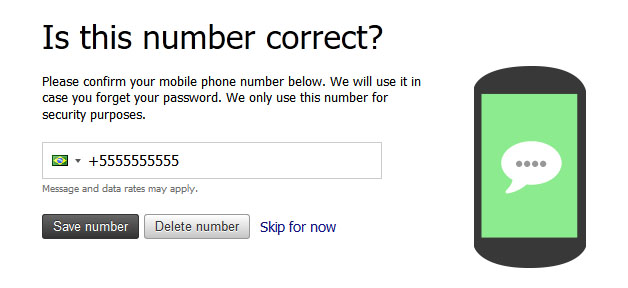
    Enter your phone number, and click Save.
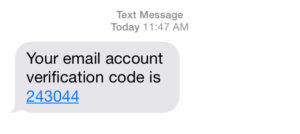
    After your phone number has been updated, you will receive a six digit verification code that confirms your number.
    Enter that code
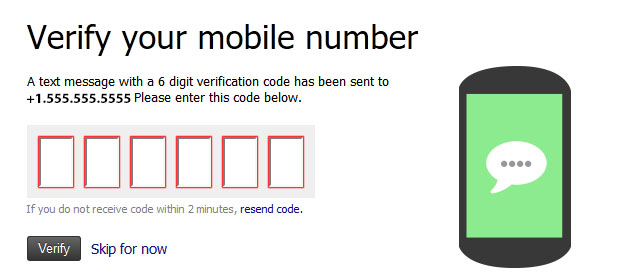
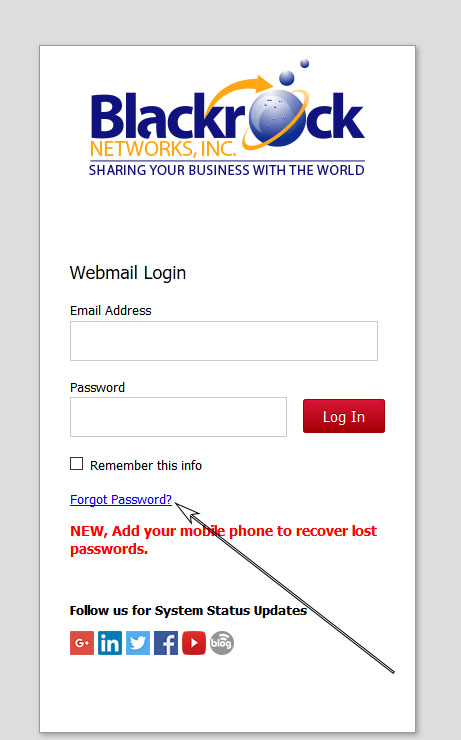
    Click Verify and that’s it. Next time you forget your password at the login page click forgot password, enter your email and you will be sent a new password.
  • Boston Dynamics robots take a run in the park

    Sometime we all need a little pick me up and seeing a robot run through the park or do the dishes always puts a smile on our face here at Blackrock Networks, Inc.

    http://money.cnn.com/video/technology/2018/05/10/lab-grown-diamonds-ada-founders-luxury-rachel-crane-orig.cnnmoney 

  • KRACK Attack: Secure Wireless isn’t so secure.

    KRACK Attack Puts Wi-Fi Connections at Risk. We are not talking about Public Wi-fi networks here, you should already know those are not secure. Instead we are talking about networks that most of us think are secure because they have a password. In fact a recent vulnerability was found in the standard protocol used on wireless networks.

    “A new security flaw, discovered by researcher Mathy Vanhoef of the University of Leuven in Belgium, appears to be affecting Wi-Fi connections.”

    “United States Computer Emergency Readiness Team (CERT) issued a warning on Monday that encouraged all Wi-Fi users to install updates when available. The organization is keeping a running list of affected vendors.”

    — http://money.cnn.com/2017/10/16/technology/wi-fi-flaw-krack-security/index.html

  • What is a NoFollow Link?

    On the internet a nofollow link is used as a way to avoid giving your “vote” to a link on your website to a third party.

    Think of it like offering your friend a list of painters in your area except with the caveat that you haven’t used any of them before so you aren’t giving them an official endorsement.

    Why is this important you might ask, because Google says it is. OK, that isn’t the only reason but it is certainly an important one. Google and the other major search engines have been working for years to sort through spam sites with paid links with sites with real value in their endorsements. In 2005 the nofollow link first came on the stage but was not yet widely used but over the years it has become more widely used in the web development community.

    Why in 2017 and I posting about it again, because more non-technical people now manage their own websites using Content Management Systems (CMS). Whether Drupal or WordPress or a third-party service a lot of these people aren’t aware of the little tweaks needed that aren’t part of the user interface they might be using.

    If you are interested in learning more contact out team to schedule a training session on how to add nofollow links to your website.

    ”What

  • Microsoft Paint returns from the grave

    After the news got out that MS Paint, the first computer drawing app for most people back in the day, would be left by the way side people all over called for a redo.

    According to CNN,

    “Following an outcry from fans on Monday, Microsoft (MSFT, Tech30) said the app will soon land in the Windows Store for free.

    “In the future, we will offer MS Paint in the Windows Store also for free, and continue to provide new updates and experiences to Paint 3D so people have the best creative tools all in one place,” a Microsoft spokesperson told CNN Tech late Monday night.” Read More

    So what is Paint 3D you ask?

    Here is a quick video to show what Microsoft hopes will be the replacement for MS Paint.

  • How do I add other admins or change admin roles for my Facebook Page?

    To add Blackrock Networks, Inc. as an admin to your Facebook Page: (Updated for 2017)

    Note you have to first have created a page, (We don’t recommend you go it alone contact us if you need to create one.)

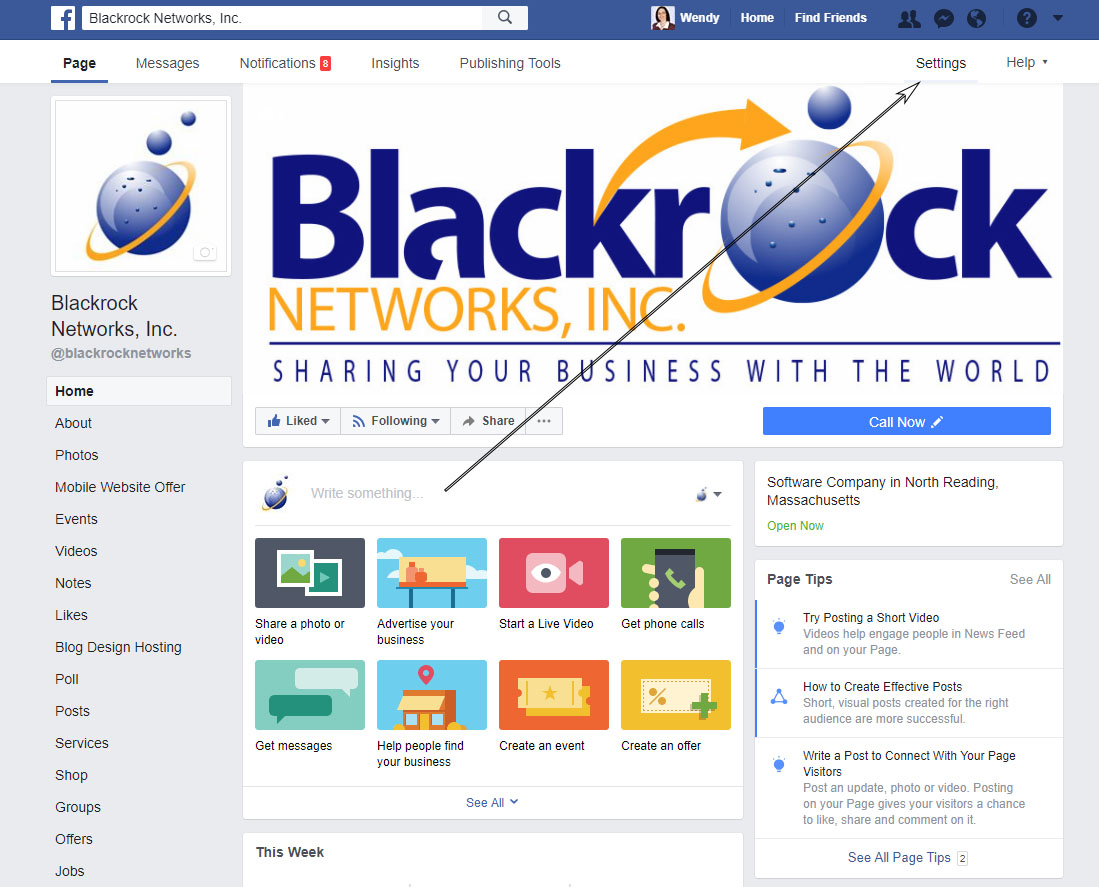
    1. Click on Settings in the top right corner of the business page (not the very top of the browser)

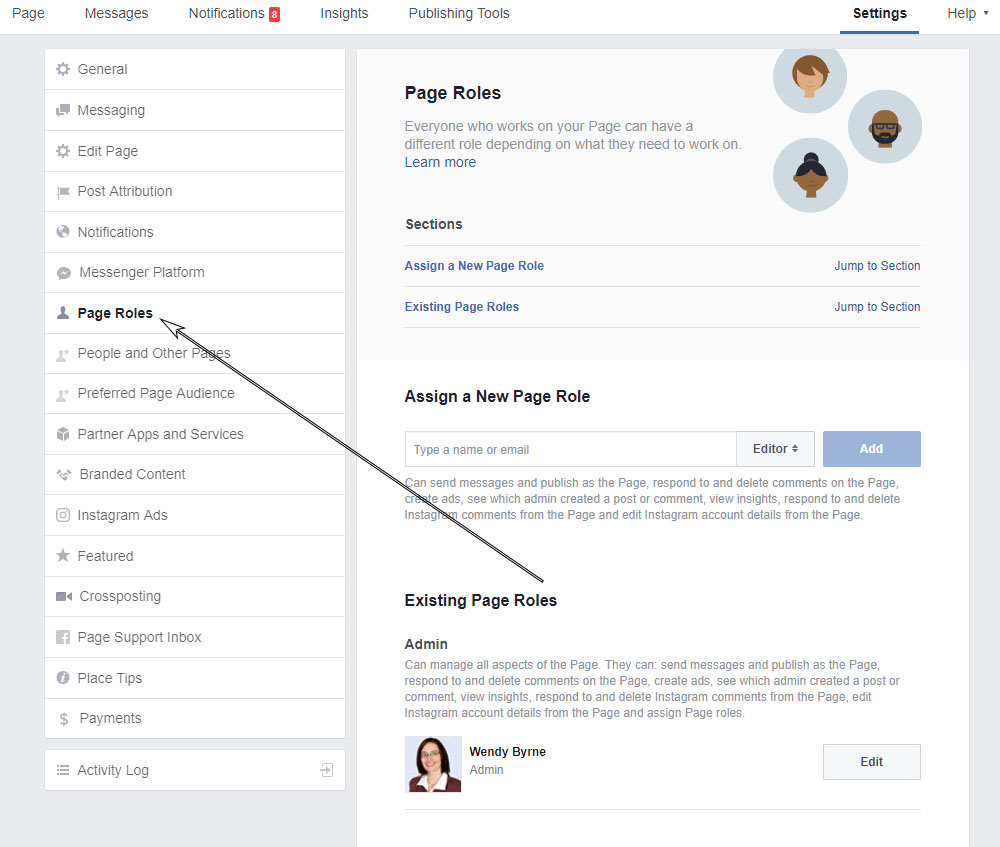
    2. Click on Page Roles on the left side

    3. Under the Assign a new page role start typing Wendy Byrne or the tech assigned to your account  (as long as we have liked the page we should show up)


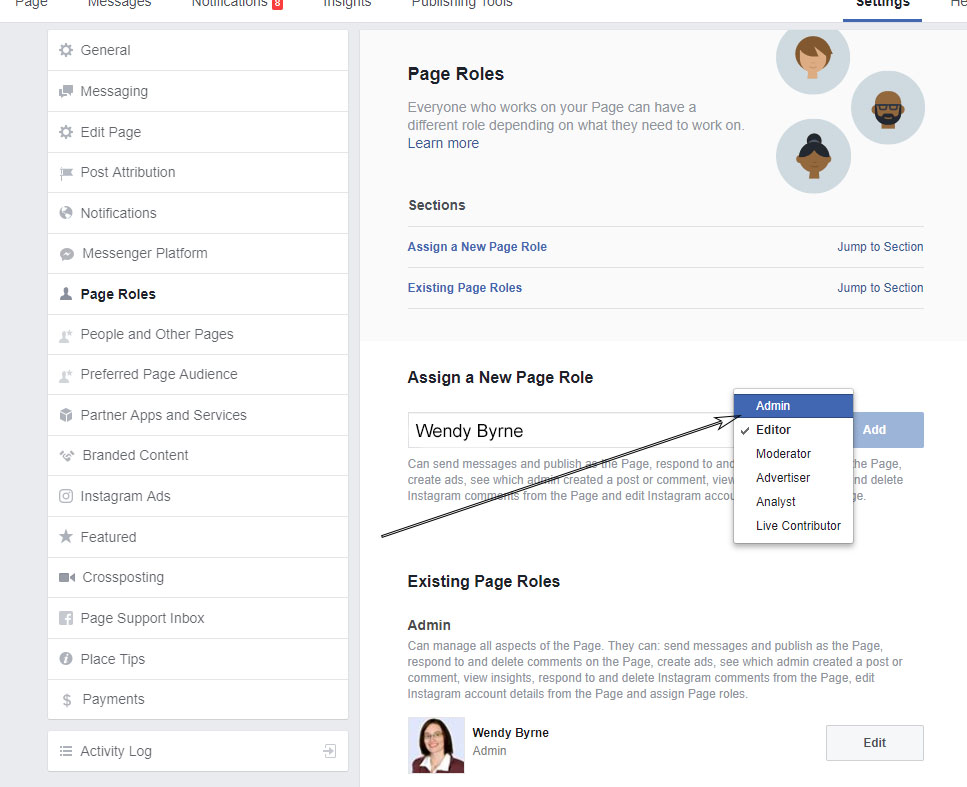
    4. Change the Editor access to Admin so we can fully manage your page.

    5. Click Add

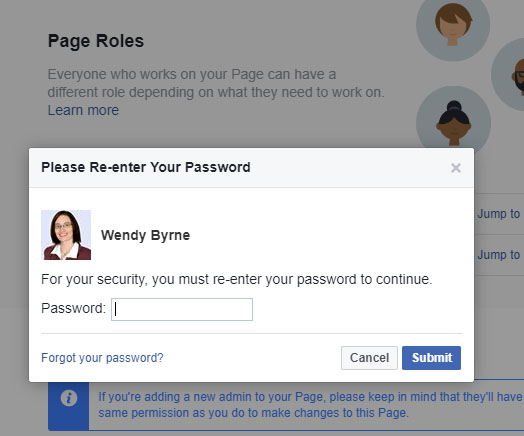
    6. You will be promoted to re-enter your password for security purposes. Enter your password and click Submit.

    That’s it. The new admin will now received an email and they will need to click accept and they should now see your page in the list of accounts they manage.

  • Web Ads, What to do?

    In a previous post I mentioned how Google was working to knock out bad ads on the web. A recent announcement now shows Apple is jumping on board as well. Check out the article below for more.

    “Apple and Google are cracking down on obnoxious online ads. And they just might change the way the web works in the process.” – Wired.com

  • Recover your password / Update your Phone # in Webmail

    A while back a new feature to reset your password using your phone was added however it seems that a number of people still haven’t taken full advantage of this feature. In order to help you along we are putting some step by step instructions below for you.

    You can recover the password for your Email account by having the system send your phone a text message that verifies your identity. This feature must be enabled by your site administrator, and you must enter a mobile phone number for your account before it will work.

    Following are some frequently asked questions and answers about this feature.

    How do I update my phone number?

    Log in to your Webmail account at webmail.blackrocknetworks.com

    In the top-right corner, click the account’s username and then select Update Phone.

    Enter your phone number, and click Save.

    After your phone number has been updated, you will receive a six digit verification code that confirms your number.

    Enter that code

    Click Verify and that’s it. Next time you forget your password at the login page click forgot password, enter your email and you will be sent a new password.
  • How much do you know about cybersecurity?

    Check out this interesting quiz: Test your knowledge on cybersecurity topics and terms by taking our 10-question quiz by the PewResearch Center

    You might also find this article interesting: 4 myths — and facts — about online security


  • Typos, it happens to everyone even Amazon

    Everyone makes mistakes, although usually it doesn’t result in hundreds of websites going down. In our line of work typos can be one of the most common errors. Most of the time it is limited to an email or a text edit on a website but the other day an Amazon engineer’s typo had a larger than expected impact on business around the world.

    Read more about it here: http://money.cnn.com/2017/03/02/technology/amazon-s3-outage-human-error/index.html

  • We will say it again, SSL …

    OK, so we have mentioned it time and again that it is a good idea to get an SSL certificate and I won’t list all the reasons again in this post but what I will say is it shouldn’t be considered optional anymore. Google is no longer gentle suggestion websites have SSL it is screaming it from the roof tops, or should I say the browser bar.

    “To help users browse the web safely, Chrome indicates connection security with an icon in the address bar. Historically, Chrome has not explicitly labelled HTTP connections as non-secure. Beginning in January 2017 (Chrome 56), we’ll mark HTTP pages that collect passwords or credit cards as non-secure, as part of a long-term plan to mark all HTTP sites as non-secure.”

    If you don;t have an SSL certificate yet contact us and we can help you set one up. Contact sales@blackrocknetworks.com

    For more go to: https://security.googleblog.com/2016/09/moving-towards-more-secure-web.html


  • Google takes on bad ads

    A very interesting read on how Google worked through 2016 to combat bad ads that pose risk to users as well as their plans for making a safer web for 2017.

    Posted: JAN 25, 2017, written by Scott Spencer
    https://blog.google/topics/ads/how-we-fought-bad-ads-sites-and-scammers-2016/

  • Holidays are here

    Along with the holidays comes email marketing campaigns, new website launches, lots of SEO for holiday specials but it also is a great time to look back and reflect on the years business as well as take time to enjoy family and friends. For that reasons our office will be closed from Dec. 22nd to Dec 31st for the holidays.